Канал на RUTUBE:

HI EVERYONE
THIS TUTORIAL IS ALL ABOUT PHOTO CORRECTION.
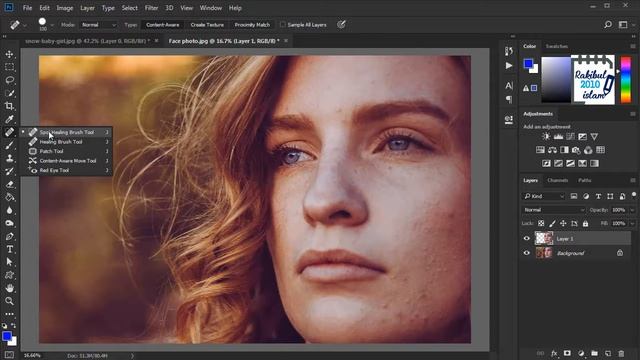
IN THIS TUTORIAL I HAVE TAKEN AN OLD IMAGE ANY BY USING SOME TOOLS
LIKE SPOT HEALING BRUSHHEALING BRUSHPATCH TOOLCLONE STAMP TOOL
AND BRUSH.
-SPOT HEALING BRUSH- can be used to clone areas from an image and
blend the pixels from the sampled area seamlessly with the target area.
The basic principle is that the texture from the sample area is blended
with the color and luminosity surrounding wherever you paint.
-HEALING BRUSH -In the Toolbox select the Healing Brush Tool.
Set brush size and style.
On the Options bar select the Sampled option.
Alt-click somewhere on your image to define a sampling point.
Paint with the Healing Brush Tool on the damaged area.
-CLONE STAMP TOOL -The Clone Stamp tool paints one part of an image over another part of the
same image or over another part of any open document that has the same color
mode.
You can also paint part of one layer over another layer.
The Clone Stamp
tool is useful for duplicating objects or removing a defect in an image.
-PATCH TOOL - The Patch tool is used to remove unwanted image elements.
The Content-Aware option
in the Patch tool synthesizes nearby content for seamless blending with the surrounding
content.
AND LAST BUT NT THE LEAST BRUSH TOOL.BY HOLDING ALT AFTER SELECTION OF BRUSH TOOL YOU CAN ACTIVE THE EYE DROPPER
TOOL FOR SAMPLING THE SPECIFIC COLOR OF AN AREA...AND YOU CAN START PAINTING ON THE PATCHES WHICH MAKES PATCHES INVISIBLE.
...............................................................
THIS IS IT FRIENDS I HOPE YOU WILL LIKE THIS TUTORIAL.
YOU YOU HAVE ANY QUERY REGARDING THIS TUTORIAL PLSE COMMENT BELOW.
.............................
THANK YOU
..................
LESSON 4 DOWNLOAD LINK-
.....................
INTRODUCTION -
LESSON 1-
LESSON 2-
LESSON 31-
LESSON 32-
...................................
FOLLOW US ON
FACEBOOK-
BEHANCE-
TWITTER-
PATREON-
Источник: rutube.ru